
How to get a worklog report in Jira Cloud
The question is usually simple: how many hours did each person log last week, and on what? Jira Cloud stores every worklog, but it has no screen that adds them up per person and date range. This page shows what Jira gives you on its own, where each option stops, and how Saguaro Hours for Jira does it.
Atlassian pages quoted here were read on 2026-11-04.
What Jira stores
Each time someone logs time on an issue, Jira keeps a worklog: the author, the date and start time, the time spent and a comment. People need the Work On Work Items permission to log time (Atlassian, "Configure time tracking", https://support.atlassian.com/jira-cloud-administration/docs/configure-time-tracking/). An issue's Time Spent field is the total of all its worklogs, from everyone, on every date.
Option 1: search with JQL
Jira's search has three worklog fields:
worklogDate: issues where someone logged work on a date. It takes=,!=,>,>=,<,<=and functions such asstartOfWeek()andendOfMonth().worklogComment: issues with given text in a worklog comment. It takes only~.worklogAuthor: issues where a given person logged work, for exampleworklogAuthor = currentUser(). It works in Jira Cloud (Saguaro Hours runs this search itself), although Atlassian's JQL fields page did not list it when I read it.
Source for the first two: Atlassian, "JQL fields", https://support.atlassian.com/jira-software-cloud/docs/jql-fields/
A search for one person's week:
worklogAuthor = currentUser() AND worklogDate >= "2026-10-26" AND worklogDate <= "2026-11-01"
Where it stops:
- The result is a list of issues, not of worklogs or hours.
- The Time Spent column shows each issue's total from everyone at any date. If you logged 1 hour last week on an issue the team has spent 40 hours on, the column says 40 hours.
- "If a work item has more than 1,000 worklogs, JQL will only search the most recent ones." (JQL fields page, above.)
To get your 1 hour, you open the issue's Work log tab and add up your entries for the week, issue by issue.
Option 2: columns, dashboards and export
- In the issue list you can add the Time Spent, Original Estimate and Remaining Estimate columns. They are issue totals, with the same limit as above.
- You can save the search as a filter and show it on a dashboard in a Filter Results gadget. Same figures.
- You can export the list to CSV. The export is one row per issue. Turning it into hours per person per week is spreadsheet work.
These are fine for "which issues did people work on". They do not answer "how many hours did each person log in this range".
Option 3: the REST API
If you can write a script, Jira's REST API gives the worklogs themselves:
- Search issues with the JQL above (
POST /rest/api/3/search/jql). - For each issue, read its worklogs with
GET /rest/api/3/issue/{issueIdOrKey}/worklog, usingstartedAfterandstartedBeforeto limit the dates. - Add the time up per author and per day.
Reference: https://developer.atlassian.com/cloud/jira/platform/rest/v3/api-group-issue-worklogs/
Three things catch people out:
- Days depend on a time zone. A worklog started at 23:30 in New York is already the next day in London. Pick one zone and use it for every day.
- You only see worklogs on issues you can browse, so two people can run the same script and get different totals.
- If your site used Tempo, Tempo's worklogs show the Tempo app as their author in Jira, not the person who logged them (Tempo, https://help.tempo.io/kb/latest/why-do-we-see-timesheets-as-the-worklog-author). A per-author total puts all of that time under the app.
How Saguaro Hours does it
Saguaro Hours runs those steps for you, as the signed-in user, and shows the result in a Reports tab that every user can open.
- Pick a range: this week, last week, this month, last month or custom dates.
- Filter if you need to: team, people, projects, projects to leave out, or a JQL query (Jira checks it before the report runs).
- Group by user, team, project, epic or parent, issue, issue type, label, billable, one of your own worklog attributes, or a Jira field such as a Customer dropdown or components. Add a second grouping if you want one, for example user, then issue.
- Read the totals per group, the grand total and a table of the worklogs behind them.
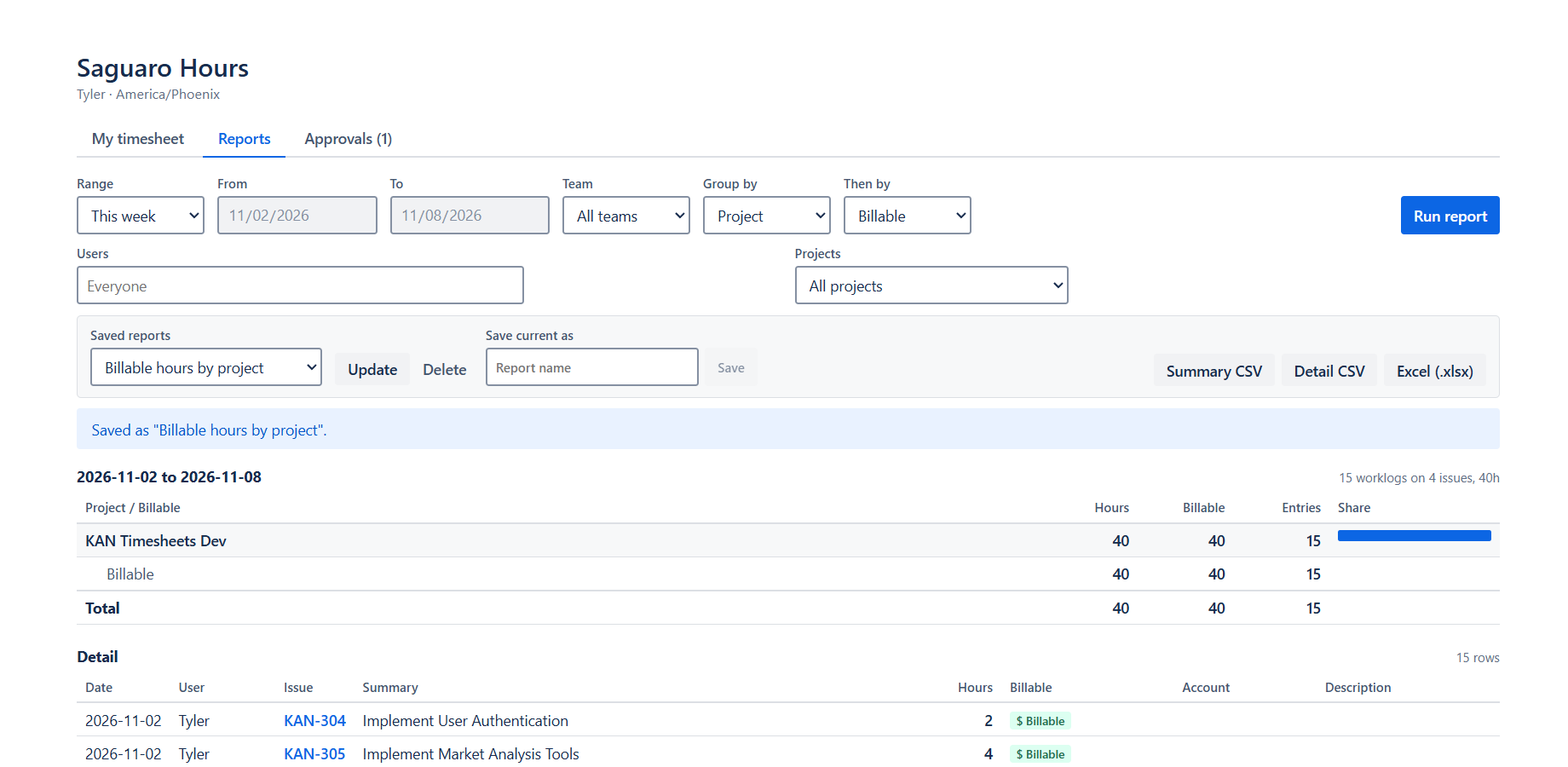
- Exports: Summary CSV, Detail CSV, or Excel (.xlsx) with both sheets. The files are built in your browser.
- Saved reports: up to 50 per person. A saved "Last week" moves forward each week.
- Estimate vs logged: grouped by issue, epic or project, the summary adds the original estimate, the remaining estimate, time logged all time and the % used, with a filter for issues over their estimate.
- Cost and revenue: once a Jira administrator sets hourly rates, administrators and the people they name see cost and revenue next to the hours. Everyone else sees hours only. See billable hours in Jira.
How it keeps the totals right:
- Hours come from Jira's own worklogs, read as you, so Jira's permissions decide what you see.
- Days are counted in your Jira time zone.
- A worklog with several labels, or a person in several teams, goes under one combined value, so nothing is counted twice.
- A report holds up to 25,000 worklogs. Above that it stops and shows no totals, because partial totals would be wrong for billing. The same happens if Jira keeps refusing with a rate limit.
- If your site used Tempo, the import on the admin page records who really logged each Tempo worklog, and reports count those hours for that person, marked "from Tempo".
Speed: in my load test, a report of 4,644 worklogs took 15 to 18 seconds. Larger reports have not been measured. Details: Reports and exports.
Status: Saguaro Hours was submitted to the Atlassian Marketplace on 2026-11-03 and is waiting for approval. Everything above is built and tested on my development site as of 2026-11-04. The build under review is older: it does not yet have the JQL filter, projects to leave out, grouping by Jira fields, estimate vs logged, or cost and revenue.
Related
- Weekly timesheets in Jira, with a free Excel template
- Tracking billable hours in Jira
- Jira time tracking apps compared
- Tempo cost calculator
Email me when it's live
Saguaro Hours is free for up to 10 users. Email me when it's live and I will send one email on the day the listing is approved.