
Weekly timesheets in Jira
A weekly timesheet is one person's week on one screen: a row per piece of work, a column per day, and totals. Jira Cloud logs time on each issue, one entry at a time, and does not show a person's week across issues. This page covers how to get that view without an app, a free Excel template, and how Saguaro Hours for Jira does it.
What Jira gives you
You log time from an issue: open it, log work, enter the time spent, the date and a comment. Atlassian's time tracking pages describe that and the site settings (hours per day, days per week, display format), and say Marketplace apps can extend it. They describe no weekly view. Sources: "Log time on a work item" (https://support.atlassian.com/jira-software-cloud/docs/log-time-on-an-issue/, read 2026-11-03) and "Configure time tracking" (https://support.atlassian.com/jira-cloud-administration/docs/configure-time-tracking/, read 2026-11-04).
Seeing your week without an app
- Find the issues. Search with JQL for the week, for example
worklogAuthor = currentUser() AND worklogDate >= "2026-10-26" AND worklogDate <= "2026-11-01", and save it as a filter. - Get the hours. The search lists issues, and its Time Spent column is each issue's total from everyone at any date. For your own hours per day, open each issue's Work log tab. More on this in how to get a worklog report in Jira.
- Write them down. Many teams keep the week in a spreadsheet, then log it in Jira, or log in Jira and copy the totals into a spreadsheet for the manager.
Free Excel timesheet template
Download the Jira weekly timesheet template (.xlsx). Free to use, copy and change. No sign-up.
What is in it:
- Timesheet sheet. Your name and the Monday of the week; the date of each day fills in. Columns: Issue key, Summary, Mon to Sun, Total, Billable. Twenty rows.
- Totals. Each row's total, each day's total and the week's total, then billable hours (rows marked Yes), non-billable hours, your required hours (40 to start with; change it) and the hours still short.
- Checks. Day cells take decimal hours from 0 to 24 (1.5 is 1 hour 30 minutes, 0.25 is 15 minutes). Billable is a Yes or No list.
- Entries sheet. It turns the grid into one row per issue and day with hours: Issue key, Date, Hours, Billable, Description. Saved as CSV, that is the shape most time tracking imports read.
- Instructions sheet. How to fill it in and how to save the entries as CSV.
What a spreadsheet cannot do: the hours are not in Jira until someone logs them, and nothing stops a cell from changing after a manager signed the sheet off.
The weekly timesheet in Saguaro Hours
Saguaro Hours adds a My timesheet page to Jira. Rows are issues, columns are Monday to Sunday, with row, day and week totals.
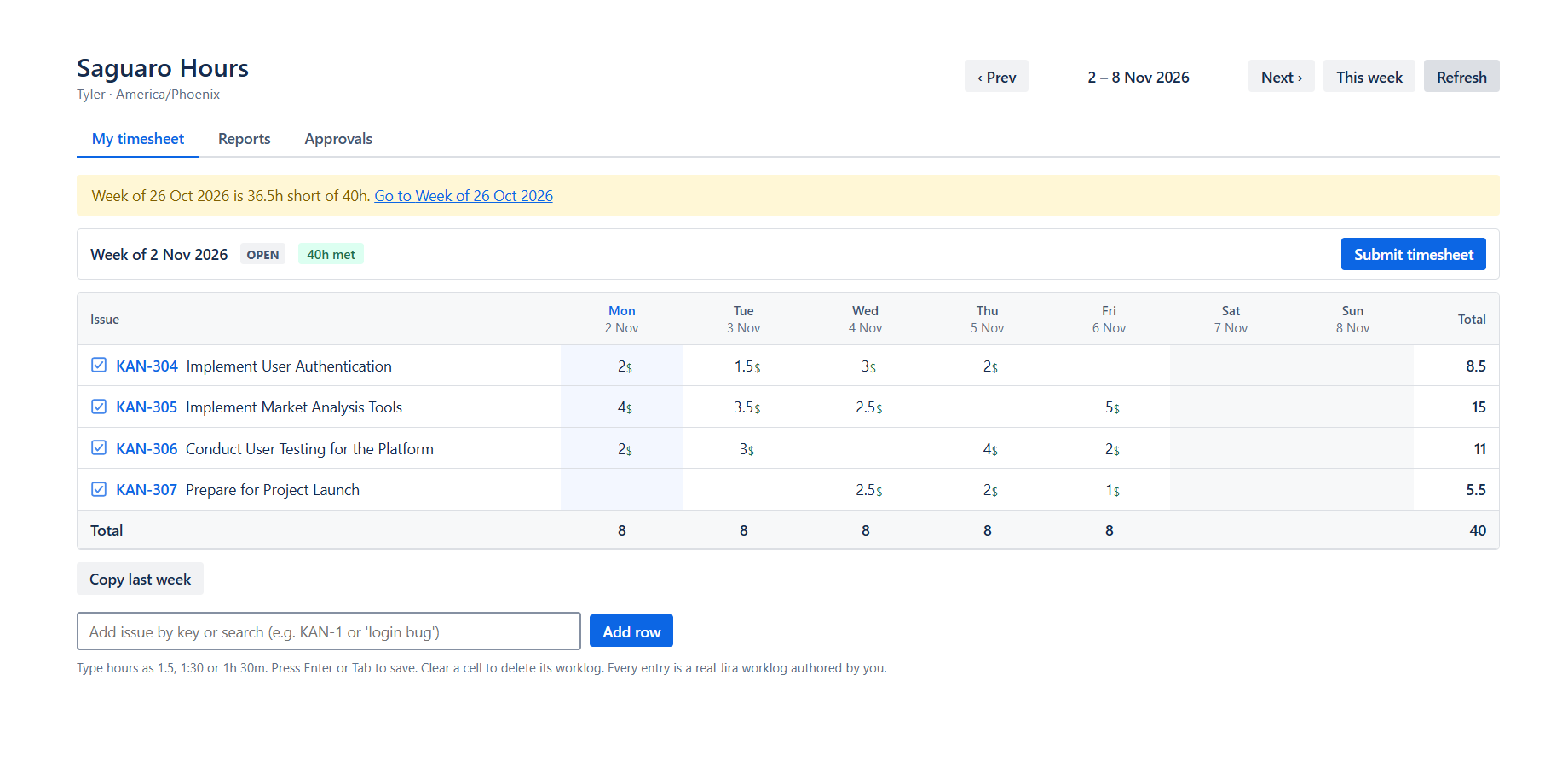
- Type in a cell. 1.5, 1:30, 1h 30m and 90m all work. Enter saves. Each entry is a normal Jira worklog written as you, so Jira's Work log tab and
worklogAuthorsearches show it, and it stays in Jira if the app is removed. - Add rows. Type an issue key or words from the summary; the box suggests issues. Copy last week adds last week's rows without hours.
- Billable. A small green $ marks a day with billable time. The Log work panel on each issue has the billable box and your own attributes.
- Timer. Start a timer on an issue's Log work panel. My timesheet lists your timers with Pause, Resume and Stop and log, which opens a filled-in worklog.
- Required hours. A chip shows, for example, "36.5h short of 40h". An administrator can set each person's hours per weekday (part-time) and enter holidays and days off, which lower the required hours.
- Submit. When the week is done, Submit timesheet sends it to your team lead. A submitted week turns grey and read-only until it is approved or rejected. See Jira timesheet approval.
- Reminder. A banner points to last week if it is short or not submitted. If an administrator turns them on, reminder emails go out through Jira's own mail.
Bring in the template, or another tracker's time
The Import tab of Saguaro Hours reads a CSV of your own time and writes each row as your Jira worklog. Save the template's Entries sheet as CSV and choose the file: the column names Issue key, Date, Hours, Billable and Description are recognised as they are (I checked this with the app's own parser on 2026-11-04). Before anything is written, a check skips rows already logged, days in a submitted or approved week, and issues you cannot see. The same tab reads CSV exports of other trackers and calendar files (.ics). Details: Import your own time.
Full details of the grid: Weekly timesheet.
Status: Saguaro Hours was submitted to the Atlassian Marketplace on 2026-11-03 and is waiting for approval. Everything above is built and tested on my development site as of 2026-11-04. The build under review has the grid, Copy last week, the billable mark, the required-hours chip with one figure for the site, Submit and the banner. It does not yet have the timer, per-person hours and holidays, reminder emails or the Import tab.
Related
- How to get a worklog report in Jira Cloud
- Tracking billable hours in Jira
- Jira time tracking apps compared
- Tempo cost calculator
Email me when it's live
Saguaro Hours is free for up to 10 users. Email me when it's live and I will send one email on the day the listing is approved.