
Bulk update Azure DevOps work items from Excel
The bulk edit dialog in Azure Boards changes one field value across selected items. When every row needs a different value, such as re-estimating a backlog, reassigning work or re-planning iterations, a spreadsheet is faster.
Steps with Excel Round-Trip
- Export. Boards, Excel Round-Trip, choose a query, add the columns to change (for example Iteration Path, Assigned To, Story Points, State).
- Edit in Excel. Fill down, sort, use formulas. Dropdowns limit State to the states each work item type allows.
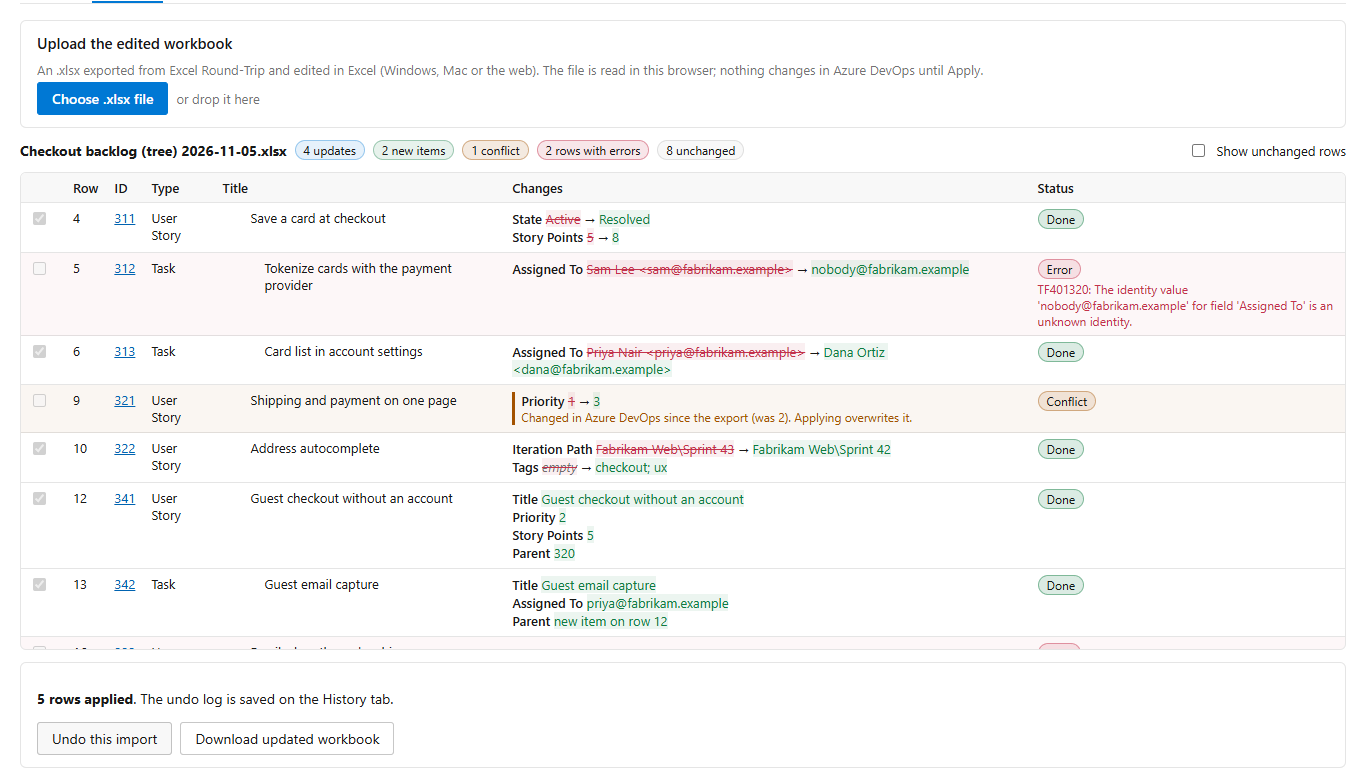
- Upload and review. Every changed cell is listed with its old and new value. Invalid values, disallowed state changes and paths that do not exist are flagged before anything is saved, and Azure DevOps checks each change without saving it.
- Apply. Rows are saved one by one with a result on each. A row someone changed after your export is shown as a conflict instead of being overwritten.
- Undo if needed. The history tab puts the previous values back.
Get Excel Round-Trip on the Visual Studio Marketplace (free up to 100 changed rows per import).
Limits
Free: any number of exported rows, up to 100 changed rows per import. Pro: $19 a month per organization, no row limit. Azure DevOps Services only.
Excel Round-Trip is made by LeDuc Systems LLC and is not affiliated with Microsoft.