
Import work items into Azure DevOps from Excel
A plan often starts as a spreadsheet: a list of features, stories under them, tasks under those. Getting it into Azure Boards means creating each item and linking it to its parent.
The built-in way
Boards, Work items, Import work items accepts a CSV file. It creates items, but there is no check of each value against the process before saving and no undo for a mistaken import.
With Excel Round-Trip
- Export an empty or existing query from Boards, Excel Round-Trip to get a workbook with the right columns and dropdowns.
- Add rows. A Work Item Type and a Title are enough. Put a child's title in the Title 2 column under its parent's row (Title 1), and a task's in Title 3.
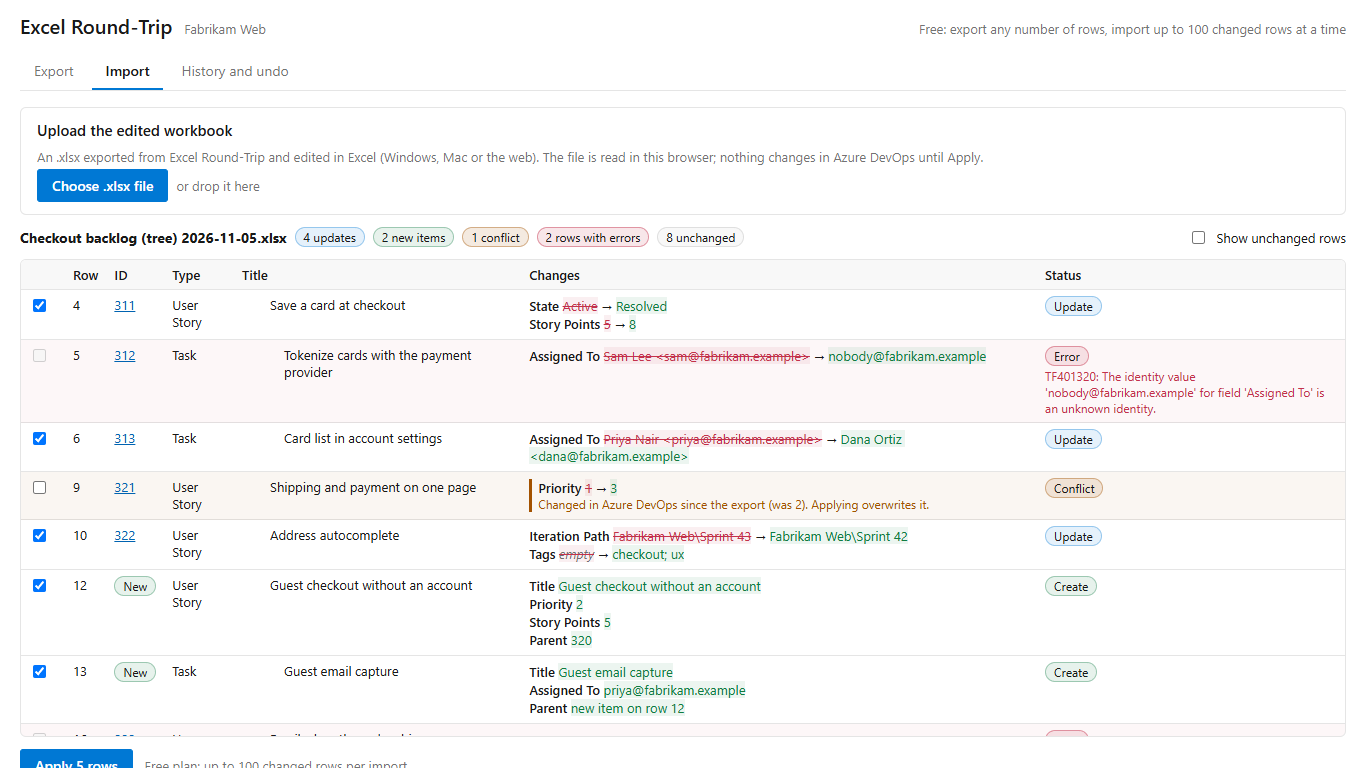
- Upload the file. New rows are listed with every field they will get; invalid values, unknown paths and missing required fields are flagged first.
- Select Apply. Parents are created before children, and children are linked to the new parents.
- If the import was wrong, Undo sends the created items to the Recycle Bin.
Get Excel Round-Trip on the Visual Studio Marketplace (free up to 100 changed rows per import).
Excel Round-Trip is made by LeDuc Systems LLC and is not affiliated with Microsoft.