
Move unfinished work to the next sprint
On a sprint backlog, Azure Boards lets you select items and move them to one iteration. That covers the simple case. When the leftover work has to be split, some to the next sprint, some to the one after, some back to the backlog, often with new owners and fresh estimates, doing it item by item is slow.
Steps with Excel Round-Trip
- Query the leftovers. Save a query for the finished sprint's Iteration Path where State is not Done or Closed.
- Export. Boards, Excel Round-Trip, choose that query, with Iteration Path, Assigned To, Remaining Work and State as columns.
- Re-plan in Excel. The Iteration Path and Area Path columns have dropdowns of your project's real paths, so each row can go to a different sprint. Change owners and estimates in the same pass.
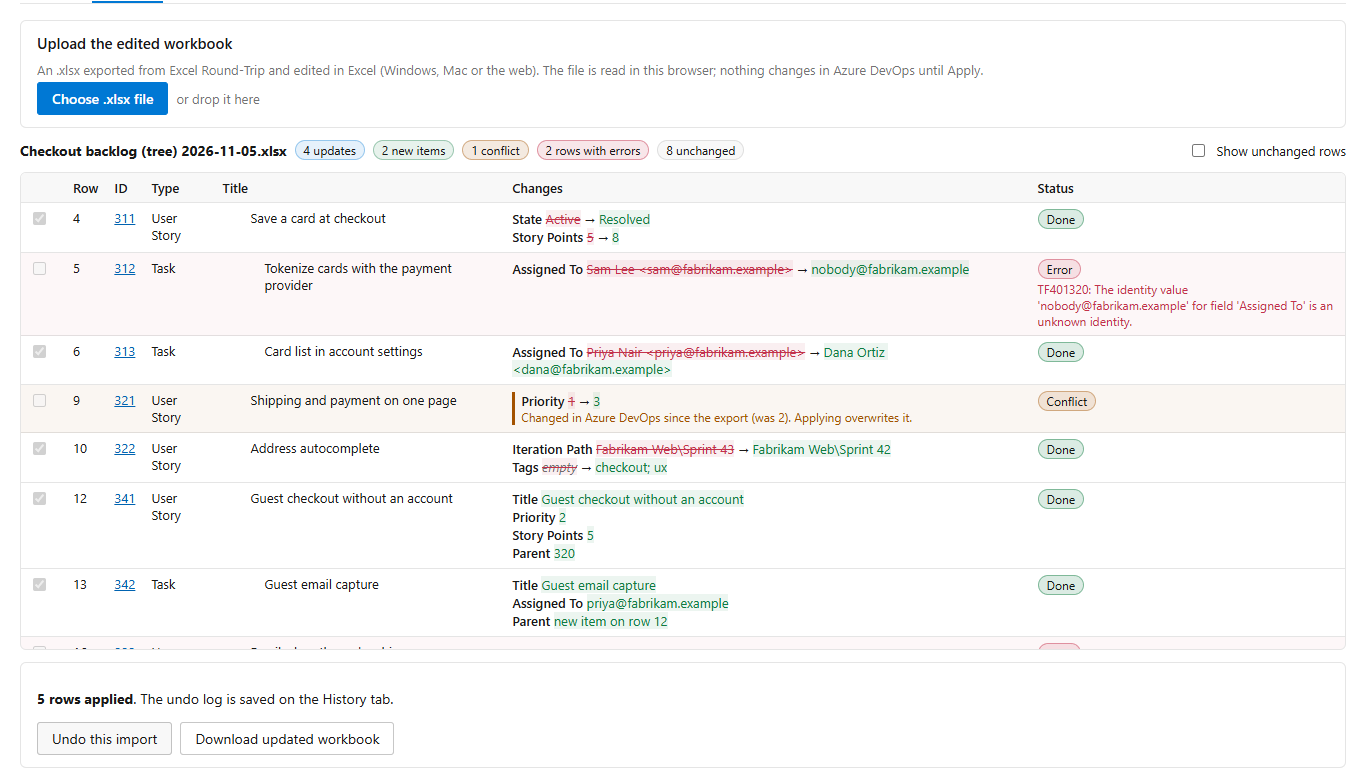
- Upload and review. Every changed cell is listed with its old and new value, and a path that does not exist is flagged before anything is saved.
- Apply, or undo. Rows are saved one by one with a result on each, and the history tab puts the previous values back.
Get Excel Round-Trip on the Visual Studio Marketplace (free up to 100 changed rows per import).
Excel Round-Trip is made by LeDuc Systems LLC and is not affiliated with Microsoft.
Guides
- Azure DevOps work items in Excel for Mac
- Bulk update Azure DevOps work items from Excel
- Open in Excel without the Office Integration add-in
- Import work items from Excel
- Export a backlog to Excel with parent and child rows
- Move unfinished work to the next sprint
Also for Azure DevOps: Saguaro Hours, time tracking and weekly timesheets in Azure Boards, free for up to 5 people.